Open-source workflows for your AI coding CLI.
Tornic is an open-source desktop app that turns your existing Claude, Codex, or Cursor CLI subscription into a deterministic workflow engine. Describe what you want in plain English - no flaky runs, no surprise bills, no lock-in.
OpenClaw is random. Your workflows shouldn't be.
Flaky execution wastes time
Stop babysitting fragile prompts. Tornic enforces deterministic state machines for every task execution.
API costs spiral out of control
Heavy users spend $100s/month on tokens. We use your existing CLI unlimited quotas to zero out the bill.
Every machine runs in isolation
Your workstations sit idle while you babysit one run at a time. Tornic orchestrates your entire fleet from a single desktop.
Why Tornic exists.
CLI vs API Cost Savings
Slash your LLM bill to $20/month flat by leveraging personal CLI subscriptions instead of pay-per-token API tiers.
Deterministic Execution
Our engine guarantees execution pathing, handling retries and edge cases without developer intervention.
Multi-machine Orchestration
Discord-integrated control allows you to trigger and monitor heavy workflows from your phone while your workstations do the work.
Local-First Security
Your workflows and data never touch our servers. Tornic is a binary that lives entirely on your hardware.
What you get
OpenClaw Replacement
Reliable, structured results designed for developers who need production-grade automation without the randomness.
OpenClaw Import
Bring your existing OpenClaw workflows, skills, and jobs over intact. Assets, schedules, and references are rewritten automatically.
Visual Workflow Editor
Design multi-step automations as a directed graph. Branch on conditions, loop back on failure, and preview the execution path before running.
Resilient Runs
Mark steps continue-on-error so a failure doesn't halt the run. Pause, inspect, skip a broken step, and resume - no cleanup required.
Workflow Templates
Browse community templates from the Tornic hub and install them in one click. Publish your own with AI-classified variables, a preview step, and versioning.
Scheduled Runs
Cron-triggered workflows with concurrency policies and a crash-loop guard. Set it once and trust it to self-protect on repeat failures.
Multi-Machine Orchestration
Control trusted peers from one central desktop. Browse templates, manage variables, and restore workflow versions on any connected machine over RPC.
Discord-Native Workflows
Create workflows in plain English directly from Discord. The bot clarifies intent, collects inputs via modals, and triggers runs from anywhere.
Browser Automation
Drive any site with Playwright steps. Tornic auto-detects installed browsers and reuses your logged-in profiles so sessions just work.
Reusable Skills
Promote any step into a reusable skill from its run cache. AI drafts the details, tracks usage across workflows, and keeps your catalog tidy.
Use Your Own CLI Subscription
Claude, Codex, or Cursor - use the tools you already pay for. No additional API tokens required.
Cross-Platform
Native desktop apps built for performance. Local-first architecture means zero latency and maximum privacy.
See it in action
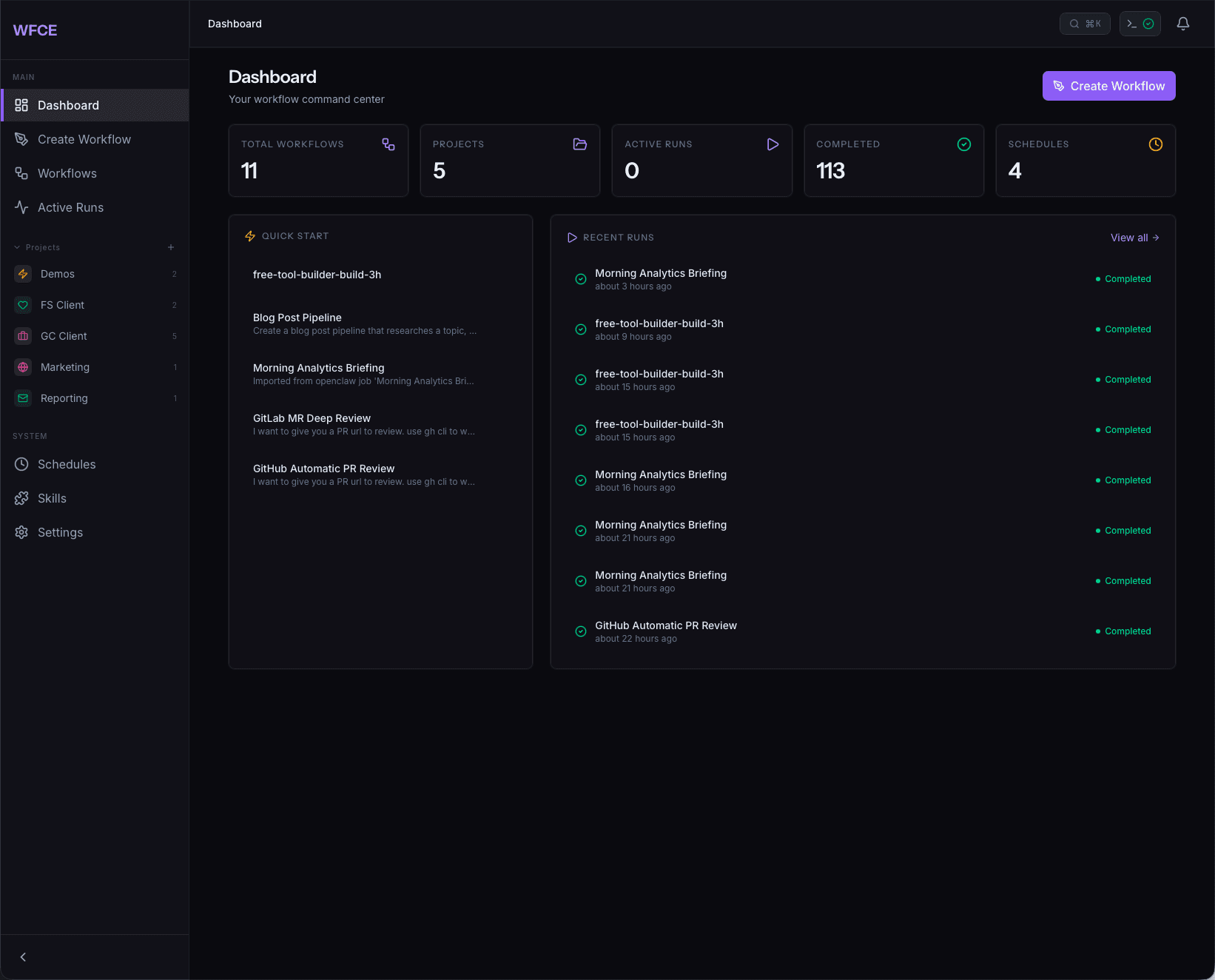
Command center for every workflow
See total workflows, active runs, completions, and connections at a glance. Quick-start templates and a live feed of recent runs keep you in control without digging through logs.
Install a workflow in one click
Community-built templates for content pipelines, lead monitoring, browser automation, and more. Preview the diagram, then install from the desktop app.
Tornic is now open source, under MIT.
The full desktop app - Rust core, React UI, workflow engine, CLI provider registry, hook engine, Discord bot - is on GitHub. Read it, audit it, fork it, ship a provider for the CLI we don't support yet. No vendor lock-in.
We make Tornic sustainable through paid licenses for multi-machine orchestration, priority support, and onboarding - not by holding the software hostage. Starter is free forever, and the source is yours to inspect either way.
Inspectable by design
Every Tauri command, every CLI invocation, every database write is in the open. Audit before you trust.
Fork-friendly architecture
Plug-in CLI providers, port-typed workflow graph, OpenSpec-driven changes - the patterns are documented so PRs land fast.
Community-led roadmap
Feature requests, bug reports, and design proposals happen in public on GitHub. No hidden roadmap.
Pricing
Open source and free forever. Optional one-time licenses unlock multi-machine orchestration, priority support, and onboarding - no subscriptions.
- Full open-source app (MIT)
- 3 active workflows
- Single machine
- OpenClaw Import
- Discord integration
- Community support
- Unlimited workflows
- OpenClaw Import
- Discord integration
- Priority email support
- Everything in Pro
- Multi-machine orchestration
- Onboarding session
Download Tornic Free
Native desktop app, MIT licensed, source on GitHub. Runs entirely on your hardware. No credit card, no telemetry, no lock-in.
macOS
Apple Silicon & Intel
Windows
Windows 10+
Linux
.deb & .AppImage
Windows and Linux builds coming soon